
How to Select the Best Tool for Security Questionnaire Automation
Key Takeaways
- The best tool for security questionnaire automation should prioritise accuracy and evidence, not just speed.
- AI-generated answers should always be grounded in approved policies, certifications, and security documentation.
- Every response should be traceable back to supporting evidence and reviewed before submission.
- Security questionnaire automation vendors should be evaluated like any other critical vendor, including their security posture, certifications, and data handling practices.
- Features such as confidence scoring, audit trails, approval workflows, and evidence management are often more important than answer generation alone.
- The goal of automation is not simply to complete questionnaires faster. It is to deliver consistent, accurate, and defensible responses at scale.
As security reviews become longer and more frequent, many organisations are turning to automation to reduce the burden on security, compliance, and sales teams. But selecting a security questionnaire automation platform is about more than efficiency. A fast answer is only valuable if it’s accurate.
Modern AI tools can generate responses in seconds, but not all platforms provide the controls, evidence management, review workflows, and auditability required for high-stakes security assessments. An inaccurate response can create compliance issues, damage customer trust, and introduce unnecessary risk.
The challenge isn’t finding a platform that can generate answers. The challenge is finding one you can confidently stand behind. In this guide, we’ll walk through the key capabilities to evaluate before selecting a platform, the questions you should ask every vendor, and the warning signs that indicate a solution may create more risk than it removes.
What Is Security Questionnaire Automation?
Security questionnaire automation uses AI and knowledge management to generate, validate, and submit responses to vendor security assessments, due diligence questionnaires, and compliance reviews. Instead of manually hunting for answers, security teams pull from a curated knowledge base of approved policies, certifications, and prior responses.
Why Does This Decision Carry More Risk Than Most Software Purchases?
Finding the best tool for security questionnaire automation may seem like a productivity decision. All you need to check is that the tool completes questionnaires faster, reduces manual effort, and helps your team respond to more security reviews.
But this decision carries far more risk than most software purchases.
Security questionnaires aren’t just forms. They contain information about your organisation’s security controls, compliance certifications, infrastructure, access management practices, data protection measures, and risk management processes. The answers you provide are often reviewed by security teams, procurement teams, auditors, regulators, and prospective customers before they decide whether to trust your organisation. That means every answer matters.
An inaccurate response can create confusion during a security review. A response that contradicts your documented policies can raise concerns with customers. And if a security incident, audit, or compliance investigation ever occurs, your questionnaire responses may become part of the evidence used to evaluate your organisation’s security practices.
Most buyers focus on how quickly a tool can generate answers rather than how those answers are created, validated, and reviewed. Modern AI tools can produce responses in seconds, but speed alone doesn’t guarantee accuracy. If the platform pulls information from outdated documents, generates unsupported answers, or lacks proper review workflows, it may introduce new risks instead of reducing them.
The goal isn’t simply to automate questionnaires. The goal is to automate them while maintaining accuracy, consistency, traceability, and trust.
The best security questionnaire automation tools don’t just help teams work faster. They help organisations provide accurate, evidence-backed responses that security teams, customers, and auditors can trust.
Also read: How to Automate Security Questionnaire Responses Without Losing Accuracy
What Separates a Trustworthy Platform From a Risky One?
Can You Actually Trust the Answers?
Most security questionnaire automation vendors promise faster responses. But speed isn’t the hard part anymore. The real question is whether you can trust the answers being generated.
A security questionnaire isn’t just another form. It contains information about your organisation’s security controls, certifications, access management practices, compliance posture, and risk management processes. If a response is inaccurate, outdated, or unsupported, it can create problems during customer reviews, audits, and procurement evaluations.
This is why the first question you should ask any vendor is simple: Where do the answers come from?
The best platforms don’t rely on generic AI models to generate responses. Instead, they use your approved knowledge base, including security policies, previous questionnaire responses, certifications, audit reports, and other trusted documentation.
Just as importantly, every answer should be traceable back to its source. If you can’t see where a response came from, it’s difficult to validate its accuracy and even harder to defend it during a security review.
A trustworthy platform should also help reviewers identify answers that require additional attention. Features such as confidence scoring and review workflows help teams focus on responses that may need human validation before they are submitted.
The goal isn’t simply to automate answers. It’s to automate them without sacrificing accuracy, consistency, or trust.
Does the Platform Use Your Approved Knowledge Base?
Not all AI-generated answers are created equally. Some platforms generate responses using general-purpose AI models with limited understanding of your organisation. While this may work for generic questions, it creates significant risks when dealing with security, compliance, and regulatory assessments.
Security questionnaires require organisation-specific answers. The right platform should be able to ingest and organise your existing documentation, including security policies, certifications, previous questionnaires, audit reports, architecture documents, and compliance evidence.
This allows responses to be generated from information your organisation has already reviewed and approved.
When answers are grounded in trusted documentation, teams spend less time correcting responses, customers receive more consistent information, and security reviews become easier to manage.
Is Every Response Backed by Evidence?
One of the biggest mistakes organisations make is treating questionnaire responses as the final deliverable. In reality, the response is often only the beginning of the conversation.
The sender may ask for proof. An auditor may request supporting documentation. A procurement team may want additional evidence before approving a vendor. Evidence management is just as important as answer generation.
The best security questionnaire automation platforms don’t simply provide answers. They help teams connect responses to supporting documentation such as policies, certifications, audit reports, screenshots, and security evidence. This creates a clear audit trail and gives reviewers confidence that each answer is supported by verifiable information.
The organisations that complete security reviews most efficiently aren’t necessarily the ones with the fastest AI. They’re the ones that can quickly prove their answers are accurate.
How to Select the Best Tool for Security Questionnaire Automation?
1. Start With the Tool’s/Vendor’s Own Security Posture
Before evaluating AI capabilities, run the same check on the vendor that your clients run on you.
Ask:
- Are they SOC 2 Type II certified?
- Is the product itself in scope of the audit?
- How do they handle subprocessors?
A security questionnaire automation vendor that cannot answer their own security questionnaire confidently is not a vendor you should trust with your compliance data.
For reference on what enterprise security certification looks like, see the AICPA’s SOC 2 framework documentation.
2. Understand How Your Data Is Handled
Your questionnaire knowledge base contains sensitive internal documentation. Treat it accordingly.
Questions to ask every vendor:
- Where is customer data stored, and in which region?
- Is data encrypted at rest and in transit?
- What is the data retention policy?
- Who within the vendor’s organisation can access customer data?
- Which subprocessors handle data, and under what terms?
This section is not optional reading. Data handling failures in a compliance tool create the exact type of risk you’re trying to prevent.
3. How the Platform Handles AI-Specific Risk
This is where most evaluations go wrong. Buyers focus on what AI can do and skip what it can get wrong.
- Hallucinations. Can the AI generate answers that have no basis in your actual documentation? If yes, the platform introduces risk rather than reducing it.
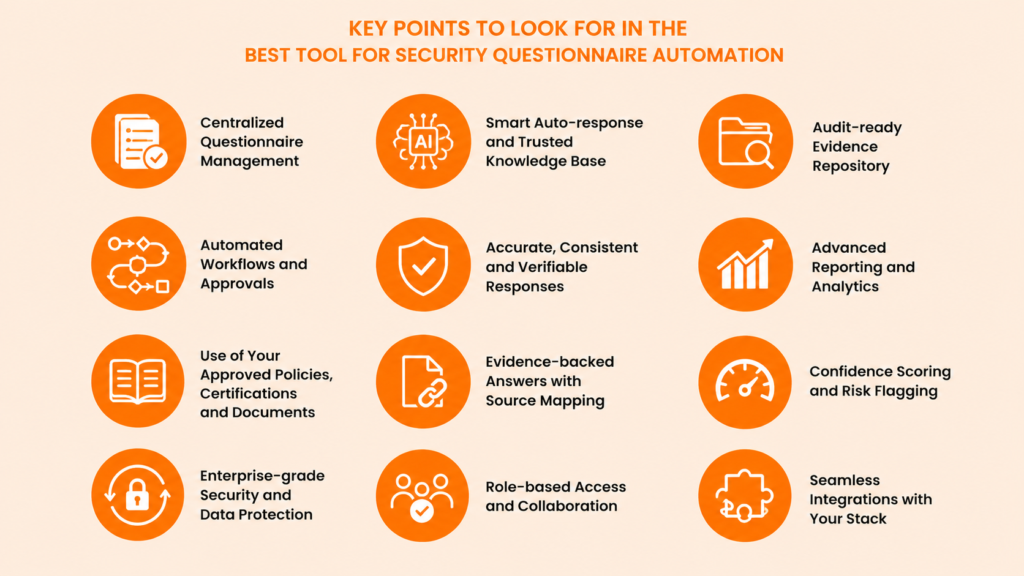
- Confidence scoring. Does the platform indicate when it’s uncertain? Low-confidence answers need human review before submission. A tool that doesn’t surface this forces you to review everything manually, which defeats the purpose.
- Grounded responses. Can the system be restricted to answer only from approved sources? This is non-negotiable for regulated industries.
- Human review workflows. Does the platform support a maker-checker model? Someone generates the response. Someone else approves it before submission. Without this, you have automation without accountability.
4. Can the Tool Support Governance in Addition to the Speed?
Many platforms automate answers. Fewer automate governance.
The difference matters when something goes wrong. If a response is disputed, can you pull up an audit trail showing who approved it, when, and against which source document? If a policy changes, does the system flag affected responses across your knowledge base?
Evaluate:
- Version history on responses and source documents
- Approval workflows with named reviewers
- Full audit trail of changes and submissions
- Collaboration features for security and legal teams
Speed without governance is how compliance failures happen.
Also Read: Best tools to automate security questionnaires in 2026
Questions to Ask Every Security Questionnaire Automation Vendor
Use this as your qualification checklist:
- Where do generated answers come from?
- How does the platform prevent AI hallucinations?
- Can answers be restricted to our internal knowledge base?
- Does the tool attach evidence to each response?
- Is there a review and approval workflow?
- What does the audit trail capture?
- How is our data stored, encrypted, and retained?
- What certifications cover the product itself?
- How are outdated responses flagged when policies change?
- What happens if a client disputes a submitted response?
Any vendor who hesitates on questions 4, 5, 6, or 8 deserves more scrutiny before you proceed.
The best tool for security questionnaire automation is one that generates responses grounded in your approved knowledge base, attaches supporting evidence to each answer, surfaces low-confidence responses for human review, and maintains a full audit trail of who approved what and when. Speed matters, but accuracy, traceability, and governance matter more in a compliance context.
Signs You’ve Chosen the Wrong Platform
Watch for these during your evaluation:
- Answers cannot be traced to a source document
- No evidence attachment capability
- No confidence scoring or uncertainty flags
- No human review or approval step
- Responses read as generic AI output, not organisation-specific answers
- The vendor’s own security documentation is thin or unavailable
If you spot more than two of these, keep looking.
Why Compliance Teams Use Narad for Security Questionnaire Automation
Narad was built specifically for organisations that cannot afford to guess.
Every response Narad generates is grounded in your organisation’s approved documentation. Policies, certifications, prior questionnaire responses, and audit reports all feed a structured knowledge base that the AI draws from. Nothing is invented.
Each answer comes with a confidence score. Low-confidence responses are flagged for expert review before they leave your system. Maker-checker workflows ensure that every submitted response has been reviewed and approved by a named team member.
Supporting evidence is attached at the response level. When a client asks for proof, you have it.
A full audit trail captures every change, approval, and submission. When a policy updates, Narad surfaces the affected responses so nothing goes stale.
For security and compliance teams in BFSI, fintech, and regulated SaaS, Narad removes the bottleneck without removing accountability.
Learn more about Narad’s security questionnaire automation platform and how it handles evidence-backed responses.
FAQ
1. Can AI answer security questionnaires accurately?
AI can answer accurately when it is restricted to approved organisational knowledge. Platforms that use general-purpose AI without grounding responses in your documentation are more likely to produce inaccurate or inconsistent answers.
2. How do I validate AI-generated security questionnaire responses?
Look for platforms that include confidence scoring, human review workflows, and source attribution. Every response should be traceable to a specific document or prior approved answer before submission.
3. What should I look for in a security questionnaire automation platform?
Prioritise evidence management, hallucination controls, audit trails, approval workflows, and the vendor’s own security certifications. A fast tool that cannot be audited creates more risk than it removes.
4. How does Narad prevent hallucinations in security questionnaire responses?
Narad restricts AI-generated answers to your approved knowledge base. Responses that fall below a set confidence threshold are flagged for human review before submission, rather than auto-approved.
5. Is Narad SOC 2 compliant?
Yes. Narad follows industry-standard security practices and maintains SOC 2 compliance to help customers confidently manage sensitive security, compliance, and vendor risk data. Customers can request additional documentation and security information as part of their vendor due diligence process.
Conclusion
Selecting the best tool for security questionnaire automation comes down to one question: can you stand behind every answer this tool generates?
Speed is easy to find. Accuracy, evidence, governance, and auditability are not.
The right platform doesn’t just make your team faster. It makes your security reviews defensible. And in a compliance context, that distinction is everything.
Check out Narad’s